
Using AI at work without doing something you'll regret
You already know AI could save your team hours a week. You’re also not sure whether using it ends with you explaining to a customer, a regulator, or an insurer how their data got somewhere you can’t see. So the tool sits there, half-used, and the question sits with it: is it safe to use AI at work?
The fear is reasonable. It’s also not a reason to sit it out.
The real risks, calmly stated
Your inputs can become training data, and the terms move. On consumer tiers the default favours the provider. OpenAI improves its models on ChatGPT conversations unless you turn that off. In August 2025 Anthropic changed its consumer terms so Claude Free, Pro and Max chats train the model unless you opt out — with retention going from 30 days to five years if you don’t. And the consent toggle arrived pre-set to on, which tells you how most people answered. I hit this during my own research. It’s why I don’t treat terms of service as something you read once at signup. Business, enterprise tiers, and the APIs are not trained on by default; that’s most of the argument for putting your team on one.
Shadow AI. Your staff are already using tools you never approved, on accounts you can’t see, with data you’d rather they didn’t paste. This is shadow IT wearing a new hat, and odds are nobody is sure it’s their job to track.
The EU AI Act, in one calm paragraph. The Act sorts AI uses by risk. Almost everything a small firm does (drafting, summarising, research help) sits in the low-risk band. The point isn’t to be frightened of it. The point is to be able to say which band you’re in and why, before someone asks.
The failure mode isn’t exotic. In spring 2023 Samsung let engineers use ChatGPT, and within weeks confidential internal material had been typed into it; the company restricted generative AI on its devices while it worked out how to do this safely. That is not a story about reckless people. It’s a story about an employee with a deadline, pasting something into a box that answers fast.
Where does your data actually go?
Strip out the buzzwords and “data sovereignty” is one question: when you paste something into a chatbot, where does it go, who can read it, and could it come back out somewhere you didn’t intend?
You won’t get a clean answer for every tool. So here are the three rules I follow, in the order I apply them:
first, if it’s not my data I do not paste it in without explicit permission (other business internals, user data of an app, etc.)
second, if I wouldn’t post it on a publicly available website, I think very hard about it
third, can I somehow sanitize or sterilize (i.e. financial number crunching probably doesn’t need every column, but the AI can be leveraged still if the data is first sterile)
That third one is the one people skip. Most of the value in a spreadsheet survives the removal of the names, the account numbers, and the two columns that make it sensitive. Sanitise first, then ask.
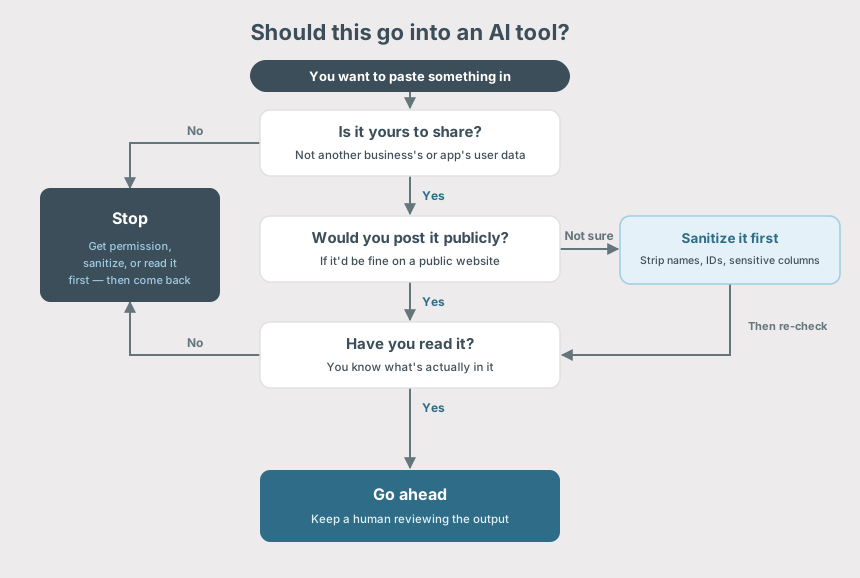
And one more, which is really the whole thing compressed:
if you haven’t read whatever you are about to paste in, you’re probably wrong as you have no clue what could be in there and accidentally leaked (spillage)
Is it safe to use AI at work? It depends on the task
Safe enough now: research, first drafts, summarising public or sanitised material, code help (snippets), brainstorming. The common thread is that the input isn’t sensitive and a human reads the output before it matters.
Never without consent: customer PII, regulated data, anyone else’s confidential information.
Never unchecked: anything where a confident, fabricated answer would sail straight through, because nobody downstream knows enough to catch it.
“Just ban it” is not a strategy
Here’s where I’ll stake a position, because a lot of cautious advice quietly lands on “don’t.”
“Just ban it” is both not going to work and going to cause you to fall behind. AI is here and is a powerful force multiplier. For everything from research, to writing help, to software development it just cannot be beat for token output.
A ban doesn’t remove AI from your company. It removes your visibility into it and pushes it onto personal accounts you have no claim over. You keep the risk and lose the audit trail.
But the reason to keep a human in the loop isn’t sentiment, it’s a real limitation:
AI wins on token output. Humans win on token input.
It writes faster than you ever will, but it does not know what it doesn’t know. In my own research I found the larger models will often skip the tools they’ve been handed and reason an answer out of their training instead of checking the source. Confidently. The translation for your business: AI doesn’t know when it’s wrong, and a bigger, smarter-seeming model is often more confidently wrong, because it leans on what it “remembers” instead of looking. Research on how agents do real work finds the same shape, fast and flawed in ways that need a human to catch.
Start with one workflow, not the whole business
The mistake is trying to “adopt AI” everywhere at once. Pick one task that’s low-risk and high-repetition, keep a human on the output, notice what it actually saves you, then expand.
If you want my pick, start where I did: turning rough, disorganised notes into something usable.
I constantly find myself brain dumping into “scratchpad” markdown or text documents in disorganized fashions. It’s part of my process…no shame. I use the AI to help me get those disorganized “ADHD” fueled notes into something I can review.
This post is that workflow. The stories and the opinions are mine, dumped into a scratchpad in the order they occurred to me; the AI organised them. What you’re reading isn’t a machine’s idea of what a security consultant sounds like. It’s my tidied voice, and that distinction is the whole game.
Second: summarising long documents and meetings into what was decided and who owes what.
the speed which a “Cliffs Notes” equivalent can be generated of a long document is amazing. Meetings often veer off the agenda, using an agent to help summarize the meeting is a fast strategy to get a quick TL;DR
Do that inside an organisation-controlled, DLP-gated tool rather than someone’s personal account and the risk drops sharply. If Microsoft or Google-scale identity management is out of reach, a Team plan with a reputable cloud AI provider gets you most of the way: a workspace you administer, instead of a dozen logins you don’t.
Three more, briefly:
- Email drafting is the gateway drug, and for that reason the riskiest; copy, paste, send, and you’ve spilled a customer’s details without breaking stride.
- Cleaning up sanitised data is a quiet win; it knows the spreadsheet formula faster than you can search for it.
- First-draft SOPs and policies are fair game on one condition: they have to end up describing your operation. Carbon-copy policies are exactly what comes apart when a customer sends you a security questionnaire and starts asking whether the document matches reality.
The one question to ask any AI vendor
Ask it plainly: do you train on my inputs? Then read the answer in the terms, rather than the marketing page; check which tier that answer applies to, because the consumer plan and the business plan are frequently not the same deal. Do not ignore the updates, diary a reminder to read them again. As Anthropic’s consumer change shows, the answer you get today is not a promise about next year.
If you’d rather have someone do that reading with you, and get the guardrails in place before your team is three tools deep, that’s what our Security Configuration & Consultancy work is for.
References & further reading
Sources cited in this post:
- EU AI Act explorer — https://artificialintelligenceact.eu/
- OpenAI — How your data is used to improve model performance — https://openai.com/policies/how-your-data-is-used-to-improve-model-performance/
- Anthropic — Updates to Consumer Terms and Privacy Policy (28 Aug 2025) — https://www.anthropic.com/news/updates-to-our-consumer-terms
- TechCrunch — Anthropic users face a new choice: opt out or share your chats for AI training (28 Aug 2025) — https://techcrunch.com/2025/08/28/anthropic-users-face-a-new-choice-opt-out-or-share-your-data-for-ai-training/
- TechCrunch — Samsung restricts generative AI tools after internal data leak (2 May 2023) — https://techcrunch.com/2023/05/02/samsung-bans-use-of-generative-ai-tools-like-chatgpt-after-april-internal-data-leak/
- “How Do AI Agents Do Human Work?” (Wang et al., 2025) — https://arxiv.org/abs/2510.22780
Related reading on this site: